Python API and IPC
Drive Bernard Review from a script or a pipeline application. The protocol, the Python client, every command by family, the events and complete examples.
Bernard Review can be driven from Python, Maya, Nuke, Houdini, a production tracker or any language that can open a TCP connection. Everything an artist does by hand has its command: open clips, play, compare, grade, export, start a session, publish notes. This page is enough to automate the player; the exhaustive reference, field by field, is the API reference (also opened by Help > API Documentation).
The protocol
- Address:
127.0.0.1, port 5556 by default. A player started with--ipc-port Nlistens onN: that is how two players run on the same machine. - Format: JSON Lines. Each request is one JSON object on one line, ended by
\n, with a"cmd"field:{"cmd": "seek", "frame": 24}. - One reply per request, in the order sent, usually within a few milliseconds:
{"status": "ok", "cmd": "seek", ...}or{"status": "error", "cmd": "seek", "reason": "..."}. An error always carries a reason in plain words and never waits for your time-out. There is no request ID: a reply is matched to its request by its"cmd". - Events from the player (
{"event": ...}) arrive on the same connection, mixed with the replies (see below). - One client at a time. A second connection waits until the first closes.
- Local only. The port listens on the loopback. A connection that looks like a browser's request (an HTTP line, a
Host:header) is closed without running anything: a web page cannot drive the player. A line holds at most 16 MiB. - No secret goes through this port for trackers: a request that carries a tracker password, key or token is refused.
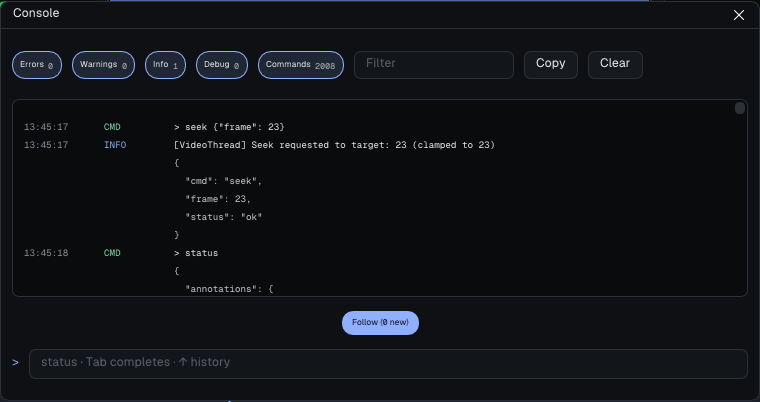
To try it without writing code: Window > Console (Ctrl+Shift+C) sends the same commands from inside the player, with Tab completion: status, seek {"frame": 24}, or the full JSON form. It asks before the commands that write files, publish or close the player.
The Python client
bernard_api.py wraps the protocol in one class, BernardClient, with one method per command. It is installed next to the player, in the api folder:
| System | Location |
|---|---|
| Windows | C:\Program Files\Bernard Review\bin\api\bernard_api.py |
| Linux (RPM) | /usr/share/bernardplayer/api/bernard_api.py |
Linux (.sh archive) | <install folder>/share/bernardplayer/api/bernard_api.py |
It needs nothing but Python 3's standard library.
import sys
sys.path.append(r"C:\Program Files\Bernard Review\bin\api")
from bernard_api import BernardClient

client = BernardClient(host="127.0.0.1", port=5556)
if not client.connect():
    raise SystemExit("Bernard Review does not answer on port 5556")

reply = client.open_media("D:/shots/SQ010_SH010_ANIM_v002.mov")
if reply is None or reply.get("status") == "error":
    print("refused:", reply and reply.get("reason"))
else:
client.play()request(dict)sends a command and waits for its reply (adict), errors included: it raises no exception for the player's refusal, and returnsNoneon a time-out or a lost connection.send_command(dict)sends without waiting.- The named methods (
play(),seek(),set_exposure(),export()...) call one or the other; the ones that return data go throughrequest(). on("frame_changed", function)subscribes a function to an event; a background thread reads the connection.
Without the client, a few lines are enough:
import json, socket

with socket.create_connection(("127.0.0.1", 5556)) as s:
    f = s.makefile("rw", encoding="utf-8", newline="\n")
    f.write(json.dumps({"cmd": "status"}) + "\n"); f.flush()
    for line in f:
        msg = json.loads(line)
        if msg.get("cmd") == "status":      # skip the events
            print(msg["playback"]["currentFrame"]); break
What to know before writing a script
- Frame numbers.
seek,set-in,set-outand the--frameoption take the position in the clip counted from 0, not the number printed on the ruler. On a clip that starts at1001, the displayed frame1010is position9.statusgives the position (playback.currentFrame) and the first frame number (playback.startOffset). - What is asynchronous.
openreplies before the clip is probed:status.playback.transitioningstaystrueuntil the clip is on screen.exportqueues a job: follow it withexport-statusor theexport-doneevent.export-noteswrites its files in the background. Afterset-proxy, wait forstatus.viewport.retieringto go back tofalse. - A fresh profile asks the first-launch question in a modal window: send
{"cmd": "set-ui-level", "value": "complete"}first. quitreplies, then closes the player cleanly, without asking whether to save: sendsave-playlistorexport-notesfirst if the review matters.- Several requests of the same name in flight cannot be told apart: send them one after the other.
Commands, by family
The player's 115 commands. The fields in brackets are the main ones; track is "A" (the default) or "B".
Playback and range
| Command | Effect |
|---|---|
play, pause, reverse-play | Play, pause, play backwards |
seek (frame) | Go to a position (from 0) |
step-frame (delta) | Step delta frames forward or back |
toggle-loop | Loop the range |
set-playlist-playback (loop_mode 0, 1 or 2, dont_wait_incomplete_shots) | Loop off, on the clip or on the playlist |
set-in, set-out (frame, optional) | In and out points; without frame, the playhead |
clear-in-out, set-in-out-lock (value) | Clear the range; stop the mouse from moving it |
set-fps (value), set-start (value) | Frame rate; first frame number |
set-volume (value 0 to 1), set-mute (value), toggle-mute | Sound |
Clips and playlist
| Command | Effect |
|---|---|
open or load (path) | Open a file or a sequence on track A, adding it to the playlist |
load-playlist (path) | Load a .bpl, .otio, .csv, .json or .edl playlist |
save-playlist (path) | Write the playlist as .bpl (notes, statuses, grade, drawings) |
playlist-add (path), playlist-play (index), playlist-remove (index), playlist-move (from, to), playlist-clear | Manage the playlist (indices from 0) |
drop (paths, at: track_a, track_b or viewport_b) | Like a drop of files from the file manager |
Comparison and versions
| Command | Effect |
|---|---|
set-ab-mode (value), toggle-ab | A/B mode |
set-track-b (path) | Put a file on track B |
set-ab-view (value: a, wipe, b), ab-flip | A alone, wipe, B alone; flip A/B |
set-wipe (position 0 to 1, angle in degrees) | Wipe position and angle |
cycle-b (direction: prev, next) | Previous or next version on B |
pin-track-b (value), set-b-version-preload (value) | Pin B; preload the neighboring versions |
set-ab-label-mode (interaction, always, never), set-metadata-track (a, b, ab) | A/B letters; the Metadata tab's track |
build-matrix (sequence, id, shots), get-matrix | Fill and read the Version Board (see Integrations) |
Color
| Command | Effect |
|---|---|
set-exposure, set-gamma (value, track) | Exposure (in stops), gamma |
set-white-balance (temp, tint from -1 to 1, track), set-offset (value: [r, g, b], track) | White balance, offset |
set-colorspace (value) | Track A's input space: ACEScg, sRGB, AP0, AdobeRGB, ProPhoto, Rec709, LogC3, LogC4, or Auto |
set-channel (value: RGBA, R, G, B, A, L; track) | Channel shown |
set-stage (stage, on, track) | Turn a stage off or on (exposure, levels, curves, gamma...) |
set-curve (channel: master, r, g, b; points or reset) | Curves, [x, y] points on the ACEScct axis |
set-hue-range (range, hue, saturation, lightness) | Hue ranges |
color-panel (target, before_after, picker, levels_auto, preset_save, preset_apply...) | The color panel; with no field, reads it |
scopes (open, kind) | The scopes and their last measures (histogram, clipping) |
set-layer (track_idx, layer_idx), layer-info (track) | Pass of a multi-layer EXR |
Viewer, interface and windows
| Command | Effect |
|---|---|
zoom (value, 1 = one source pixel per screen pixel), pan (x, y), fit, flip | Framing |
set-fullscreen (value), set-window-size (width, height), set-ui-scale (percent) | Main window |
set-theme (dark, light, neon, system; or sombre, clair, systeme), set-ui-level (essential, complete) | Display mode and interface level |
reset-layout, new-window (view), close-window (name or all), windows | Layout and panel copies |
contact-sheet (open, mode, card_w...) | Contact sheet |
set-tool (tool: pen, text, arrow, rect, laser, eraser, pipette, select) | Paint tool |
debug-mouse (x, y, down, alt, release) | Simulated mouse, for interface tests |
Notes, captures and export
| Command | Effect |
|---|---|
export-notes (output_dir) | Write export.json and export.html without any dialog |
screenshot (output, frame, annotations) | A PNG of track A's clip, graded as on screen |
export (output, preset, source, playlist, format, codec, color, burn_in, annotations, watermark, recipient...) | Export frames or a movie; queued |
export-status, export-cancel, export-presets | Follow, cancel, list the presets |
export-recipe (action: list or run; name, file or recipe; clips, recipient) | Export recipes |
Memory and decoding
| Command | Effect |
|---|---|
set-proxy (proxy_idx: 0 = 1/1, 1 = 1/2, 2 = 1/4, 3 = 1/8, 4 = Smart RAM-Fit) | Decode resolution of the clip on screen |
set-slow-decode-tier (auto, off) | When decoding cannot keep up |
set-gpu-decode (value) | GPU decode for NOVA (beta): on, off, or the state |
set-gpu-yuv (value) | GPU YUV upload for movies (beta): on, off, or the state |
set-gpu-video-decode (value) | GPU video decode (beta): on, off, or the state |
set-gpu-prores (value) | GPU ProRes decode (beta): on, off, or the state |
set-ram-limit-gb, set-vram-ring-limit-gb (value; 0 = Auto for VRAM) | Memory budgets |
set-hardware-decode (value) | Hardware decoding |
ram-fit-apply, precache-playlist (value), full-quality (value), cache-clip-frames (clip_id) | Smart RAM-Fit, preloading |
ram-info (frames) | Memory use, clip by clip |
cache-info, cache-purge (scope) | Compression cache: present, but still empty in this version |
Review sessions
| Command | Effect |
|---|---|
session-create (name, user_name, password, reach: network or this_computer) | Host; the reply gives the links |
session-join (address, user_name, password), session-leave | Join, leave |
session-status | The whole session state: participants, pilot, voice... |
session-pass-baton (participant_id), session-set-sync (locked) | Pass control; Local Review |
chat-send (text), chat-log (last) | Chat |
laser (x, y, active), laser-status | Laser pointer |
voice-test (seconds) | Play a tone through the voice speaker |
stream-enable (on, width, height), stream-status | Streaming to web guests |
Trackers (no secret in any request)
| Command | Effect |
|---|---|
tracker-sites | The sites of trackers.json |
tracker-connect (site), tracker-disconnect (site, forget) | Connection |
tracker-projects, tracker-playlists (project_id) | Browse |
tracker-load-playlist (playlist_id, mode: replace or append) | Load a playlist |
tracker-publish (items, status, dry_run) | Publish the notes |
tracker-download-media (index), tracker-cancel | Download a preview; cancel |
Diagnostics
| Command | Effect |
|---|---|
status | The player's whole state (see below) |
system-info | Version, system, graphics card, libraries; no name, no path |
dump-thumbnails (output, track) | The timeline's thumbnails as a PNG sheet |
quit | Close the player cleanly |
Events
The player broadcasts these lines to its client, unasked:
| Event | Fields |
|---|---|
play, pause | — |
frame_changed | frame: the position, on every frame where it changes (playback, drag, jump) |
export-done | ok, cancelled, error, frames_written, output, jobs, seconds, encoder |
tracker-connected | ok, site, user, reason |
tracker-projects, tracker-playlists | ok, projects or playlists, reason |
tracker-loaded | ok, items, missing_media, reason |
tracker-publish-done | published, skipped, failed, dry_run |
tracker-download-done | index, ok, path or reason |
status
{"cmd": "status"} returns the whole state. The most useful blocks: playback (state, currentFrame, startOffset, fps, ab_mode, ab_view, transitioning, the late_frames and lost_frames counters), color (track A's grade, channel), viewport (decoded and original resolution, proxy_idx, retiering, zoom), decode (decode time, too_slow), track_b, ram_fit and playlist (one entry per clip).
Examples
Open the latest render and play it (from a Nuke button, for instance):
client.open_media("D:/renders/SQ010_SH010_COMP_v003/SQ010_SH010_COMP_v003.1001.exr")
client.set_colorspace("ACEScg")
client.play()
Follow the playhead (to keep a Maya timeline in step, for instance):
client.on("frame_changed", lambda e: print("position", e["frame"]))
client.on("play", lambda e: print("playing"))
Export dailies and wait for the end:
client.export("D:/dailies/<clip>.mov", preset="dailies_prores_lt",
              playlist=True, burn_in=True)
result = client.wait_for_export()
print(result["state"], result.get("error"))
Collect a review's notes:
import json, os, time
out = "D:/review/SQ010_notes"
client.export_notes(out)
time.sleep(2)  # the files are written in the background
notes = json.load(open(os.path.join(out, "export.json"), encoding="utf-8"))
Start a password-protected review session:
r = client.session_create(name="SQ010 dailies", password="...")
for link in r["links"]:
    print(link["kind"], link["link"])   # lan, vpn...
File formats
The api folder holds the JSON schemas of the files exchanged: playlist.schema.json (the .bpl playlist, with the x_tracking block of tracker identifiers), notes_payload.schema.json (the notes' export.json) and export_recipe.schema.json (export recipes), and sample export jobs in export_examples/.
See also: Command line and headless export, Integrations.