Notes and export
Take a review's notes out of the player, export frames or movies with burn-in and a watermark, and set up export recipes for several deliveries at once.
Export the notes
Every export of the notes for people is one file. Export as HTML, at the top of the Review Notes tab (or File > Export Notes as HTML..., or Export > HTML in Essential), writes one web page with every note and every drawn frame inside it: it opens with a double click and can be mailed alone. File > Export Notes as PDF... (or Export > PDF in Essential) writes one PDF to print or send, a page per shot with its notes and pictures (the Japanese, Chinese and Korean text in the PDF reader's own fonts; an emoji shows as ?). File > Export Notes as CSV... (or Export > CSV in Essential) writes one CSV for production: shot, version, status, author, note, timecode. The player asks where to save (the last folder, a name like Review_<playlist>_<date>.csv), then says Exported with Open, Show in Folder and Copy Path. For a pipeline, the folder export (a JSON file a script can read, and the pictures) stays: see Python API and IPC. Without a tracker, Finish Review saves the playlist and then offers PDF, CSV, HTML or Not Now: see Trackers.
Export frames or a movie
File > Export Frames / Movie... opens the Export window. The playlist's right-click menu also offers Export This Clip... and Export Whole Playlist....
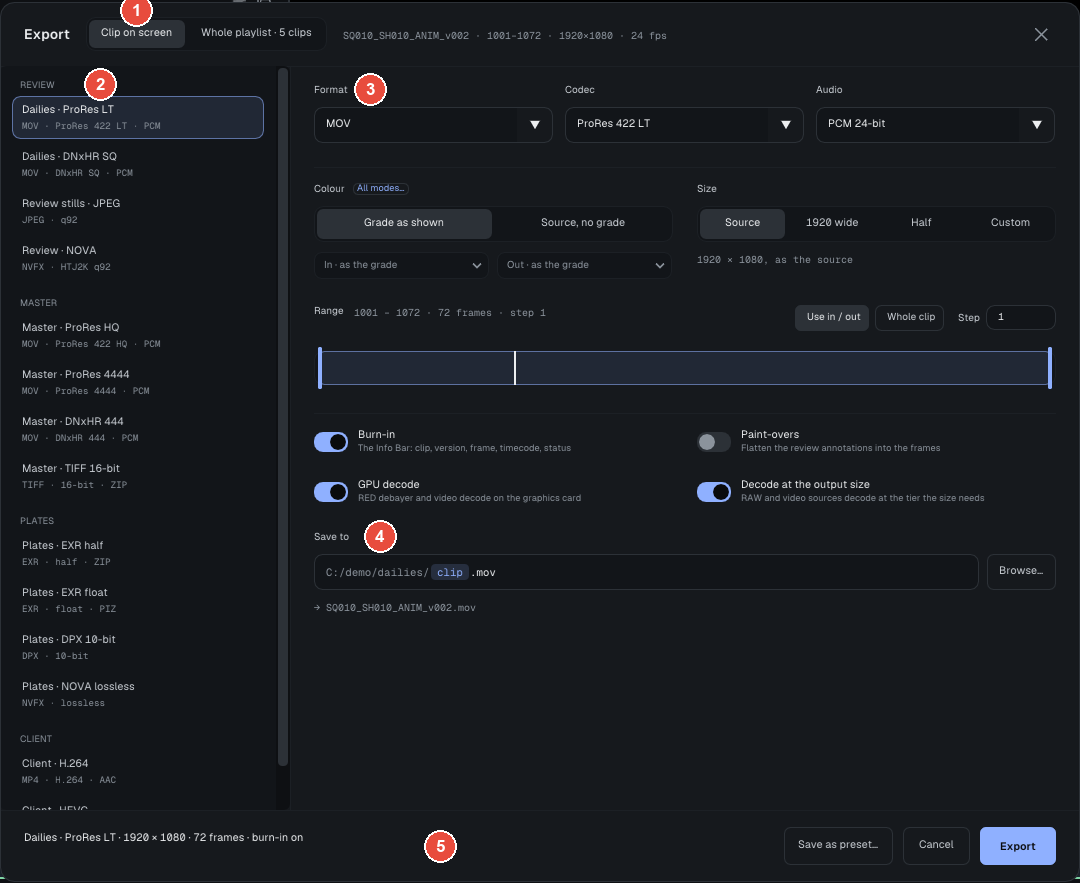
On the capture:
- 1 · The source: Clip on screen or Whole playlist, with the clip's name, range, size and frame rate.
- 2 · The presets, sorted by use: Review, Master, Plates, Client, then Custom, your studio's own. A click applies a preset; changing a setting it fixes then turns the window to Custom.
- 3 · The settings, from top to bottom: Format, Codec and Audio; Format options (CRF, chroma, JPEG quality, first frame number); the color, Grade as shown or Source, no grade (All modes... adds the clip's saved grade and typed values); the size (Source, 1920 wide, Half or Custom); the range (Use In / Out, Whole Clip, Step); four switches, Burn-in, Paint-overs, GPU decode and Decode at the output size.
- 4 · Save to: the folder and the file name, where
<clip>and<version>are replaced by each clip's own. The actual name shows underneath. - 5 · The footer: Save as Preset..., Cancel and Export; when Export is grayed out, a line says why.
Technical details Output formats, H.264 and H.265 encoders, NOVA copies
| Output | Options |
|---|---|
| EXR sequence | half or float, compression zip, zips, piz, pxr24, dwaa, dwab or none; one pass or the beauty |
| DPX sequence | 10, 12 or 16 bits |
| TIFF sequence | 8, 16 or 32 bits, zip or lzw |
| NOVA sequence (.nvfx) | Wavelet or HTJ2K profile (lossy, adjustable quality), Lossless or Raw; half or float; Protect blacks (HTJ2K) keeps the grain in the blacks; All EXR layers as AOVs keeps every layer of a multi-part EXR |
| JPEG or PNG sequence | JPEG quality; 4:4:4 chroma by default |
| MOV | ProRes 422 Proxy, LT, 422, HQ, 4444; DNxHR LB, SQ, HQ, HQX, 444; MJPEG; PCM 24-bit audio |
| MP4 | H.264 or H.265, by CRF or bitrate; AAC audio |
ProRes, DNxHR and MJPEG are always available. H.264 and H.265 are written by the graphics card or the operating system: NVIDIA NVENC, Intel Quick Sync, AMD AMF or Windows Media Foundation on Windows; NVIDIA NVENC, VA-API or Intel Quick Sync on Linux. When none opens on the machine, the export is refused before the first frame; export ProRes or DNxHR instead.
The Review · NOVA (HTJ2K, q92) and Plates · NOVA lossless presets give a lossy review copy, at about a third of the EXR size, or an exact copy. The player reads these copies back; for another application, export them to EXR.
Export puts the job in the Exports queue, a window at the top right of the player. Exports run one at a time, in the background, and the player stays usable. For the whole playlist, each clip keeps its grade, its in and out points and its drawings; put <clip> in the output name.
Burn-in and drawings
Burn-in writes text into the frames: clip and version, frame number and timecode, status, resolution, frame rate, display space, date, user. The layout is the one of the info bar under the picture (View > Info Bar Under the Image), set in Edit > Preferences... (Info Bar & Overlays): six slots, each a template of tokens such as {clip}, {frame} or {timecode}. In the frames, {status} is preceded by its icon: a tick for Approved, a cross for Not Approved, a clock for Pending.
Paint-overs draws each frame's strokes, texts, arrows and shapes into the pixels, in their own colors and sizes.
The export watermark
A review copy that leaves the studio can carry a watermark: a line of text in every frame, for example {recipient} · {date} · CONFIDENTIAL.
- The text takes the tokens
{recipient}(who the export is for),{date},{time},{clip},{version},{session}and{studio}. An unknown token stays written as typed, so a typo shows. - The position: nine places (corners, middles of the edges, center) or Tiled, the text repeated over the whole frame. Opacity runs from 10 to 100%, size is a percentage of the frame's height.
- Review formats only: MOV, MP4 and JPEG. EXR, DPX, TIFF, PNG and NOVA refuse it: a plate stays clean.
- The recipient is asked when the export starts and used for that export only. It is saved nowhere: not in a preset, not in a recipe, not in the log.
Not to be confused with the viewer watermark (the W button on the transport row), which covers the screen but goes into neither exports nor screenshots.
Export recipes
A recipe describes several deliveries at once (ProRes for the editors, a watermarked H.264 for the client, EXR plates) and applies to any playlist: 12 clips and 3 outputs make 36 files.
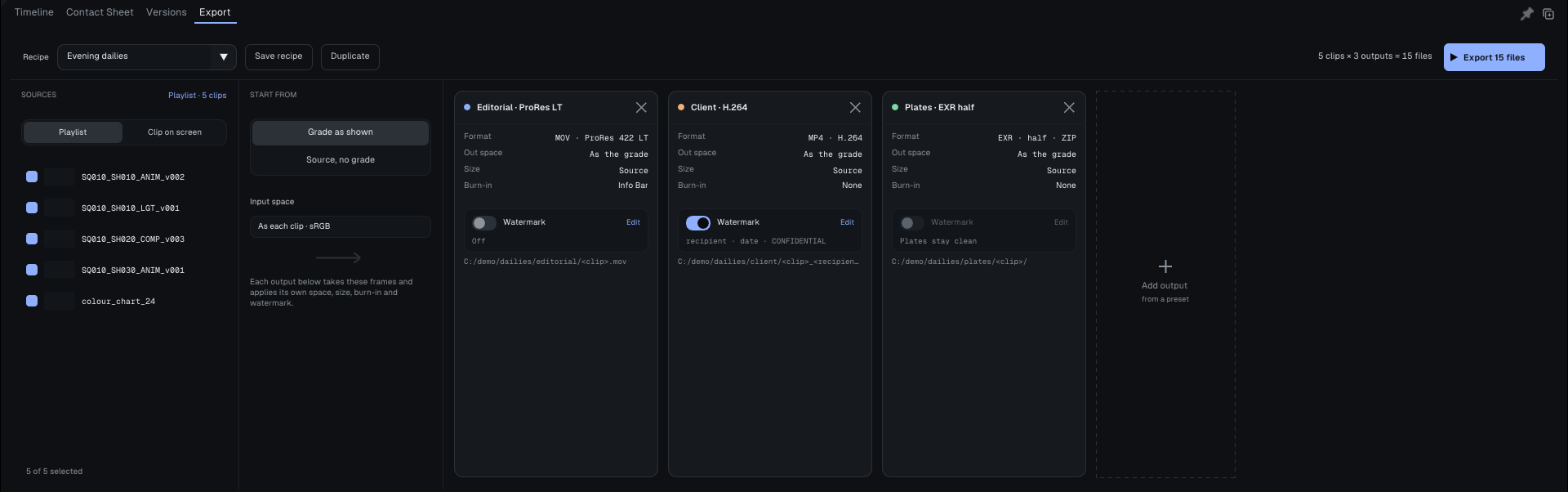
Recipes are made in the Export tab of the bottom panel:
- Along the top: the list of recipes, Save Recipe, Duplicate, the number of files and the Export button that runs it all.
- Sources: the playlist, one box per clip. Clip on screen exports the clip on screen alone.
- Start from: Grade as shown or Source, no grade, for every output.
- The outputs: one card each, with its format, size, burn-in, its Watermark block and its path. Add Output adds one from a preset. A click on a card opens its settings (Output settings).
Each path must name the clip with <clip>, or be a folder for a sequence. Recipes are saved in your profile, in export_recipes/, and your presets in export_presets/; a studio can drop its own there.
The same exports run without a window, on a render farm: see Command line and headless export.
Going further: the complete manual, parts 5.4 and 8 (Help > User Guide).