Review sessions
Host a session, invite and join, pass control, talk and chat, and let guests follow the review in a web browser.
A review session is one player hosting and the others joining it: everyone sees the same frame at the same moment. What travels is the review, not the pictures: file paths, playback state, the grade and the drawings. The clips must therefore already be on each machine or on shared storage. Only guests in a web browser receive a video picture (see below).
A session goes one of these ways:
- the studio network: the machines of one office;
- a VPN (the studio's VPN or Tailscale): to link several sites;
- this computer alone: no network, for trying things out;
- online: through the relay of the online review service. The host starts it from the player (below) or from the Bernard Review console.
Host a session
In Complete, click Sessions ▼ in the Review Session bar, then Create New Session.... In Essential, click Start Session in the right-hand panel.
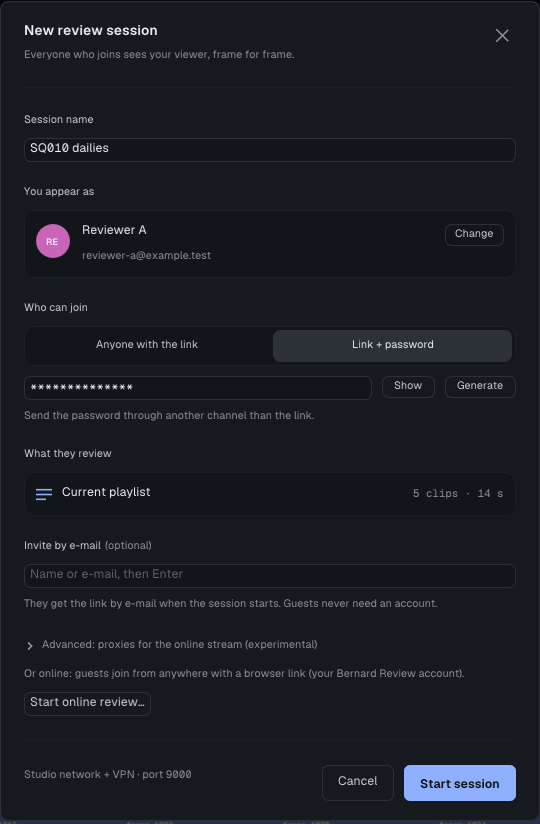
The New review session dialog asks for:
- Session name;
- You appear as: your name and e-mail; Change edits them for this session only;
- Who can join: Anyone with the link, or Link + password. Generate suggests a password that is easy to read out. Send it through another channel than the link;
- What they review: the current playlist;
- Invite by e-mail, optional: the addresses get the link when the session starts, never the password.
The dialog's footer says where the session can be reached. Start Session opens the session on TCP port 9000 and puts you in control.
Invite
Invite, in the session bar, opens Invite people. Where they join from offers only what works from this machine: Studio network, VPN, Public address (only if you know that address is reachable and accept the exposure) or This computer. Copy Link copies the link; Send the link by e-mail sends it, without the password.
For an online session, Invite gives no link: the browser link comes from the Online review window (below), and the console makes the links of the other roles.
Online review from the player
Start Online Review..., at the bottom of the New review session dialog, or Online review: sign in... in Essential's Review together, opens the Online review window:
- Sign in with your e-mail: the relay sends a code, which you type in the window. The code comes only if the address belongs to a studio of the online review service; without a studio, Create a Studio opens the console (https://review.bernardengine.com/console/, a 14-day trial) in your browser, or your studio's admin invites you. The sign-in is kept in the system's credential store for a working day. If that store refuses it, or does not answer within 5 seconds (a keyring waiting for its password in a window of its own), you are signed in all the same. On Windows the sign-in is then not kept (never in a plain file): the window says a new code will be asked next time. On Linux and macOS the window says the sign-in is kept in a file of your profile that only you can read, not encrypted.
- Start Online Review: the session is created on the relay and the window gives one browser link, with Copy Link. Guests open it in a web browser, without the player and without an account; they see your picture live.
- The window lists who is in. End Online Review closes the session on the relay for everyone.
The link is shown only in that window; it is never written to the log. Online reviews go through the paid online service; sessions on the studio network or a VPN stay free.
Join
In Complete, Sessions ▼ > Join Session...; in Essential, Join…. In Join a session, paste the Session link you were sent, check Your name, type the password if there is one, then Join. Join with microphone muted, on by default, brings you in with your microphone closed.
The session bar
From left to right:
- the red LIVE pill, the session's name (a click opens the session menu), how long it has run and the way in (LAN, VPN, online, this computer);
- the avatars of the room, the pilot crowned, how many people and how many hands are up. A click opens People;
- the sync state: Following and the pilot's initials, You're in control when it is you, Free in Local Review;
- the microphone, the chat (with the number of unread messages) and the raised hand;
- for the host, Invite and End Session, which ends the session for everyone; a guest has Leave.
The rules
- One pilot at a time. The host, to begin with. Only the pilot's playback, moves, clip changes and drawings are broadcast; the host refuses anyone else's. To pass control, the host right-clicks a person in People, then Give Control.
- What is synchronized: play, pause and direction, the playhead, clip changes and the playlist itself, the EXR pass, the whole look of the picture (zoom, framing, flips, A/B and wipe, the grade of both tracks, color spaces, channel), drawings, laser, chat and voice. The window layout stays each seat's own.
- Local Review, in the session menu, detaches your seat: you scrub, zoom and grade without moving anyone. Unticking it brings you back to the pilot's frame and look. If the pilot ticks Local Review, it broadcasts nothing until it unticks it.
- Missing clips: a guest finds each clip by its path, then by its name. The ones it lacks are listed in the Session Review panel.
Talk and chat
- Voice uses the system's default devices. The microphone button in the bar closes your microphone. In People, a right-click on your own row offers Raise Hand / Lower Hand and Mute / Unmute.
- Chat is a tab of the Media & Session panel; the chat button in the bar opens and closes it.
Guests in a web browser
A director without the player can follow the review on a web page. The host or the pilot ticks Stream to Remote Guests in the session menu: the player sends the viewer's picture, with the grade and the A/B wipe, fitted into 1920 × 1080. Drawings, the laser and chat arrive as session messages and the page draws them on top. Your watermark, the A/B letters, menus and panels are never sent. Streaming goes through a companion program, bernard-stream; in an online session the player starts and stops it on its own.
Technical details Security
The password is checked by the host and never written to disk. On the studio network a session is not encrypted: between sites, the VPN is what encrypts it. Never host a session straight onto the internet; online sessions are there for that. Ports and firewall are covered in Installation and IT.
Going further: the complete manual, parts 7 and 12.2 (Help > User Guide).